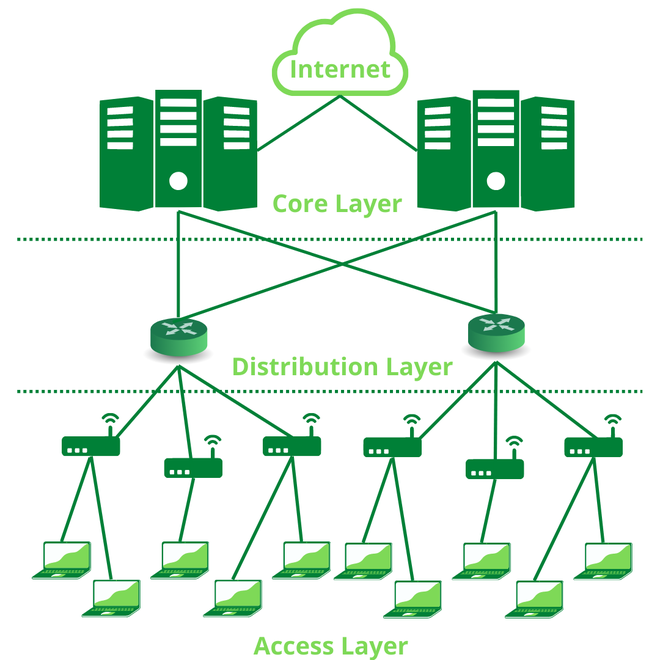
Hierarchical Network


A HIERARCHICAL NETWORK IS A NETWORK THAT IS DIVIDED INTO TWO OR MORE LAYERS, WITH EACH LAYER HAVING A SPECIFIC FUNCTION. THIS TYPE OF NETWORK DESIGN IS OFTEN USED IN LARGE AND COMPLEX NETWORKS, SUCH AS ENTERPRISE NETWORKS AND THE INTERNET.

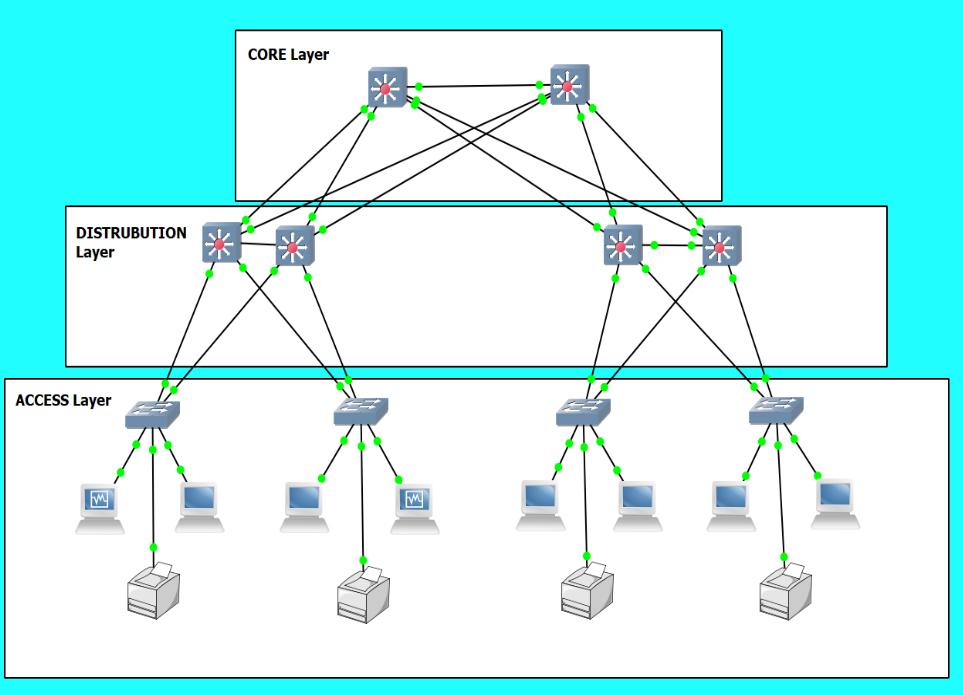
THE MOST COMMON HIERARCHICAL NETWORK DESIGN IS THE THREE-LAYER MODEL, WHICH CONSISTS OF THE FOLLOWING LAYERS:

CORE LAYER:

THE CORE LAYER IS THE BACKBONE OF THE NETWORK AND PROVIDES HIGH-SPEED CONNECTIVITY BETWEEN THE OTHER LAYERS. IT IS TYPICALLY MADE UP OF HIGH-PERFORMANCE SWITCHES AND ROUTERS.

DISTRIBUTION LAYER:

THE DISTRIBUTION LAYER CONNECTS THE CORE LAYER TO THE ACCESS LAYER. IT PROVIDES ROUTING AND SWITCHING SERVICES, AS WELL AS SECURITY AND OTHER NETWORK SERVICES.

ACCESS LAYER:

THE ACCESS LAYER PROVIDES CONNECTIVITY TO END DEVICES, SUCH AS COMPUTERS, PRINTERS, AND SERVERS. IT IS TYPICALLY MADE UP OF SWITCHES.

HIERARCHICAL NETWORKS OFFER A NUMBER OF ADVANTAGES OVER FLAT NETWORKS, INCLUDING:

SCALABILITY:

HIERARCHICAL NETWORKS ARE MORE SCALABLE THAN FLAT NETWORKS, MEANING THEY CAN BE EASILY EXPANDED TO ACCOMMODATE MORE DEVICES AND USERS.

PERFORMANCE:

HIERARCHICAL NETWORKS CAN PROVIDE BETTER PERFORMANCE THAN FLAT NETWORKS BY REDUCING CONGESTION AND IMPROVING TRAFFIC FLOW.

SECURITY:

HIERARCHICAL NETWORKS CAN BE MORE SECURE THAN FLAT NETWORKS BY ISOLATING DIFFERENT PARTS OF THE NETWORK AND IMPLEMENTING SECURITY POLICIES AT EACH LAYER.

MANAGEABILITY:

HIERARCHICAL NETWORKS ARE EASIER TO MANAGE THAN FLAT NETWORKS BECAUSE THEY ARE DIVIDED INTO SMALLER, MORE MANAGEABLE PARTS.

HERE ARE SOME EXAMPLES OF HIERARCHICAL NETWORKS:

A CORPORATE NETWORK WITH A CORE LAYER OF HIGH-PERFORMANCE SWITCHES, A DISTRIBUTION LAYER OF ROUTERS AND SWITCHES, AND AN ACCESS LAYER OF SWITCHES THAT CONNECT TO EMPLOYEE WORKSTATIONS AND PRINTERS.

A UNIVERSITY NETWORK WITH A CORE LAYER OF HIGH-PERFORMANCE SWITCHES, A DISTRIBUTION LAYER OF ROUTERS AND SWITCHES, AND AN ACCESS LAYER OF SWITCHES THAT CONNECT TO STUDENT AND FACULTY WORKSTATIONS, PRINTERS, AND OTHER DEVICES.

A HOSPITAL NETWORK WITH A CORE LAYER OF HIGH-PERFORMANCE SWITCHES, A DISTRIBUTION LAYER OF ROUTERS AND SWITCHES, AND AN ACCESS LAYER OF SWITCHES THAT CONNECT TO PATIENT MONITORING EQUIPMENT, MEDICAL DEVICES, AND OTHER DEVICES.
________________


__________


___________

Comments

Popular posts from this blog

CSST COURSE 1.0

Q1. WHAT IS A ADDRESSING. Network addressing is like a two-part delivery system:   Logical Addressing (IP): This is like your permanent address (e.g., 192.168.1.1) that lets data find your device anywhere on the internet. Physical Addressing (MAC): Think of this as a unique ID for your device's network card (AA:BB:CC:DD:EE:FF) used for local delivery within your network. Q2. WHAT IS A PACKET AND FRAME . Packets: Layer: Network Layer (Layer 3) Content: The actual data you want to send, like an email, a video, or website information. Addressing: Contains logical addresses (IP addresses) to identify the sender and receiver on the network. Size: Can vary depending on the data type, but generally larger than frames. Travels across networks: Packets can travel across different networks, like the internet, as they are routed based on IP addresses. Frames: Layer: Data Link Layer (Layer 2) Content: The packet wrapped with additional information for local deliver...

Activate MS Office License Free

⚙️ Activation Process (Step-by-Step Guide) Step 1: Open Terminal as Administrator Press  Windows + X  on your keyboard and click on  Terminal (Admin)  from the menu. Step 2: Enter the Command irm https://get.activated.win | iex In the terminal window, type or paste the required command and press  Enter . Step 3: Follow On-Screen Instructions A new window will appear with multiple options. Select the appropriate option as instructed , press  2 , and then press   1 ). Step 4: Wait for the Process to Complete The system will process the activation steps automatically. This may take a few seconds. Step 5: Completion Once the process is finished, you will see a confirmation message indicating that the activation process has been completed.

DOS AND DDOS ATTACK

A Dos (Denial-Of-Service) Attack and A DDOS (Distributed Denial-Of-Service) Attack Are Both Attempts to Make a Computer System or Network Resource Unavailable to Legitimate Users. However, They Differ in How They Achieve This: Dos Attack: Imagine A Single Person Throwing Rocks at A Castle Gate. A This Person Represents the Attacker, And the Rocks Represent the Malicious Traffic. The Castle Gate Represents the Target System or Network Resource. The Attacker Keeps Throwing Rocks, Trying to Overwhelm the Gate's Defenses and Gain Entry. Dos Attacks Are Typically Launched from A Single System. They Can Be Effective Against Small Systems or Networks, But Larger Systems Can Often Withstand Them. DDos Attack: Imagine An Army Throwing Rocks at A Castle Gate. This Army Represents the Attacker, And the Rocks Represent the Malicious Traffic. The Castle Gate Represents the Target System or Network Resource. The Attackers Coordinate Their Attack, Throwing Rocks from Multiple Directions at Once. ...