TWO-TIER ARCHITECTURE
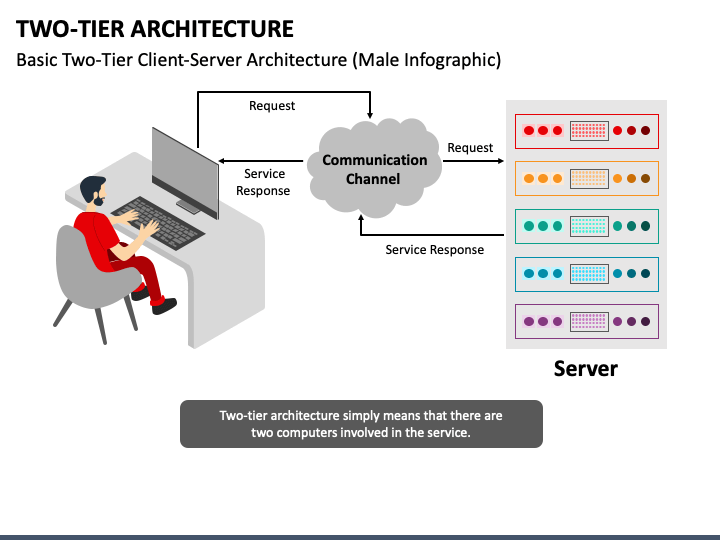
TWO-TIER ARCHITECTURE IS SIMILAR TO BASIC
CLIENT SERVER MODEL. THE APPLICATION AT THE CLIENT END DIRECTLY COMMUNICATION
WITH THE DATABASE AT THE SERVER SIDE. THE APPLICATION ON THE CLIENT SIDE
ESTABLISHED A CONNECTION WITH THE SERVER SIDE IN ORDER TO COMMUNICATE WITH
DBMS.
AN ADVANTAGES OF THE TYPE IS THAT
MAINTENANCE AND UNDERSTANDING IS EASIER COMPATIBLE WITH EXISTING SYSTEM HOWEVER
THE MODEL GIVES POOR PERFORMANCE WITH THREE ARE A LARGE NUMBER OF USERS.
THREE-TIER ARCHITECTURE
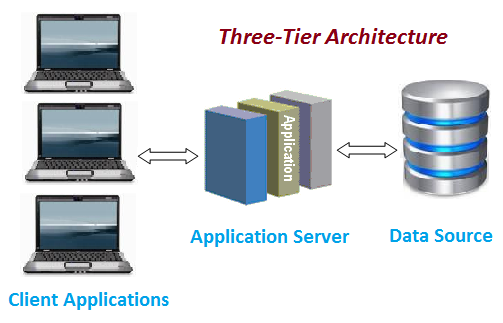
IN THIS
TYPE THERE IS ANOTHER LAYER BETWEEN THE CLIENT AND THE SERVER THE CLIENT DOES
NOT DIRECTLY COMMUNICATE WITH THE SERVER INSTEAD IN INTERACTS WITH AN
APPLICATION SERVER WHICH FURTHER COMMUNICATION WITH THE DATABASE SYSTEM AND THE
QUERY PROCESSING AND TRANSACTION MANAGEMENT TAKE PLACE THE INTERMEDIATOR LAYER
ACT AS A MEDIUM FOR EXCHANGE FOR PARTIALLY PROCESS DATA BETWEEN SERVER AND
CLIENT THIS TYPE OF ARCHITECTURE IS USED IN CASE OF LARGE WEB APPLICATION.
SPIN-LEAF ARCHITECTURE
A LEAF
SWITCH IS A TYPE OF SWITCH THAT IS USED IN A SPINE-LEAF NETWORK ARCHITECTURE.
LEAF SWITCHES ARE RESPONSIBLE FOR CONNECTING SERVERS AND OTHER NETWORK DEVICES
TO THE NETWORK. THEY ALSO PROVIDE LAYER 2 SWITCHING AND LAYER 3 ROUTING
SERVICES.
IN A
SPINE-LEAF NETWORK ARCHITECTURE, LEAF SWITCHES ARE CONNECTED TO SPINE SWITCHES
IN A FULL-MESH TOPOLOGY. THIS MEANS THAT EACH LEAF SWITCH IS CONNECTED TO EVERY
SPINE SWITCH. THIS DESIGN PROVIDES HIGH BANDWIDTH AND REDUNDANCY FOR TRAFFIC
BETWEEN LEAF SWITCHES.
LEAF
SWITCHES ARE TYPICALLY HIGH-PERFORMANCE SWITCHES WITH A LARGE NUMBER OF PORTS.
THEY ALSO HAVE A WIDE RANGE OF FEATURES, SUCH AS SUPPORT FOR VIRTUALIZATION,
SECURITY, AND QOS.
LEAF
SWITCHES ARE A KEY COMPONENT OF SPINE-LEAF NETWORK ARCHITECTURES. THEY PROVIDE
THE HIGH BANDWIDTH AND REDUNDANCY NEEDED TO SUPPORT MODERN DATA CENTERS. THEY
ALSO OFFER A WIDE RANGE OF FEATURES THAT MAKE THEM IDEAL FOR ENTERPRISE
NETWORKS.
____________
SPIN SWITCH
A SPINE SWITCH IS A TYPE OF SWITCH THAT IS
USED IN A SPINE-LEAF NETWORK ARCHITECTURE. SPINE SWITCHES ARE RESPONSIBLE FOR
CONNECTING LEAF SWITCHES TOGETHER AND PROVIDING LAYER 3 ROUTING SERVICES.
IN A SPINE-LEAF NETWORK ARCHITECTURE, SPINE
SWITCHES ARE CONNECTED TO EACH OTHER IN A FULL-MESH TOPOLOGY. THIS MEANS THAT
EACH SPINE SWITCH IS CONNECTED TO EVERY OTHER SPINE SWITCH. THIS DESIGN
PROVIDES HIGH BANDWIDTH AND REDUNDANCY FOR TRAFFIC BETWEEN SPINE SWITCHES.
SPINE SWITCHES ARE TYPICALLY
HIGH-PERFORMANCE SWITCHES WITH A LARGE NUMBER OF PORTS. THEY ALSO HAVE A WIDE
RANGE OF FEATURES, SUCH AS SUPPORT FOR VIRTUALIZATION, SECURITY, AND QOS.
SPINE SWITCHES ARE A KEY COMPONENT OF
SPINE-LEAF NETWORK ARCHITECTURES. THEY PROVIDE THE HIGH BANDWIDTH AND
REDUNDANCY NEEDED TO SUPPORT MODERN DATA CENTERS. THEY ALSO OFFER A WIDE RANGE
OF FEATURES THAT MAKE THEM IDEAL FOR ENTERPRISE NETWORKS.
TOPOLOGY VIEW OF SPIN-LEAF ARCHITECTURE

DIFFERENCE BETWEEN LEAF AND SPIN SWITCH

Comments
Post a Comment