
Theory Question Answer 21 To 30


Q21 .  

What Is A Lan Network Define Some Details ?

Answer : 

A LOCAL AREA NETWORK IS A COLLECTION OF DEVICES CONNECTED TOGETHER IN ONE PHYSICAL LOCATION, SUCH AS AN OFFICE OR HOME BUILDING.

A LAN IS USED TO CONNECT THE COMPUTER AND OTHER NETWORK DEVICES SO THAT THE DEVICE CAN COMMUNICATE WITH EACH OTHER TO SHARE RESOURCES.

LAN NETWORK RANGE IS 1 TO 10 KILO METER.

____________


Q22.

Which Series Of Switch  Is Called A Layer 2 Switch

Answer : 


Layer 2 Switches Only Operate At The Data Link Layer (Layer 2) Of The OSI Model,


Layer 2 Switches Forward Data Frames Based On The MAC Addresses Of The Source And Destination Devices. They Do Not Look At The IP Addresses Of The Devices.


LAYER 2 SWITCHES IS LESS EXPENSIVE AND EASY TO CONFIGURED.


2960 SERIES SWITCH IS CALLED A LAYER 2 SWITCH.


ANOTHER NAME LAYER 2 SWITCH IS ACCESS LAYER SWITCH.


___________


Q23.

What Is Diffrence Between Layer 2 And Layer 3 Switch. Define Shortly ? 

Answer : 

The Main Difference Between Layer 2 And Layer 3 Switches Is That Layer 2 Switches Only Operate At The Data Link Layer (Layer 2) Of The OSI Model,

While Layer 3 Switches Operate At Both The Data Link Layer And The Network Layer (Layer 3) Of The OSI Model.

Layer 2 Switches Forward Data Frames Based On The MAC Addresses Of The Source And Destination Devices. They Do Not Look At The IP Addresses Of The Devices.

Layer 3 Switches, On The Other Hand, Forward Data Packets Based On The IP Addresses Of The Source And Destination Devices. They Can Also Route Traffic Between Different Networks.

____________

Q24.

Which Series Of Switch  Is Called A Layer 3 Switch

Answer : 

While Layer 3 Switches Operate At Both The Data Link Layer And The Network Layer (Layer 3) Of The OSI Model.

Layer 3 Switches, On The Other Hand, Forward Data Packets Based On The IP Addresses Of The Source And Destination Devices. They Can Also Route Traffic Between Different Networks.

3560 AND 3650 AND 3750 SERIES SWITCH IS CALLED A LAYER 3 SWITCH.

ANOTHER NAME LAYER 3 SWITCH IS MULTILAYER LAYER SWITCH.

____________

Q25.

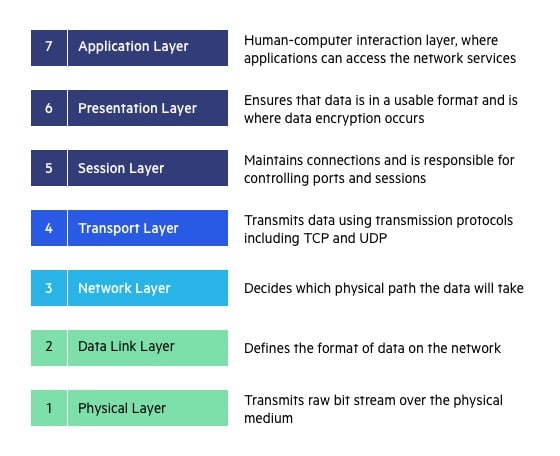
Which Layer In Osi Refrence Model.  Just Define Name ?

Answer : 

ISO REPRESENT A 1947 MORE THAN WORK AND AGAIN REPRESENTS A ISO IN 1977 AND MORE THAN WORK AN REPRESENT  IN 1983 A OSI REDFRENCE MODEL.

HIS MODEL REPRESENT A 7 LAYER.  OSI MEANS  (OPEN SYSTEMS INTERCOMMUNICATIO).

____________


Q26.

Who Is Network Model That Practical In Real Life ? 

Answer : 

TCP/IP MODEL IS REAL LIFE IMPLEMENT.

TCP/IP MODEL LAYER IS.  1. APPLICATION LAYER,  2.  TRANSPORT LAYER,  3.  INTERNET LAYER,   4.  LINK LAYER

__________

Q27.

Define Shortly About His Star And Hybrid Topology ? 

Answer : 

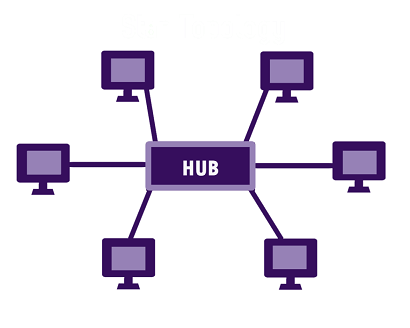
STAR TOPOLOGY

IN A STAR TOPOLOGY, ALL END DEVICES ARE CONNECTED TO A CENTRALIZED NETWORK DEVICE.

THAT CENTRALIZED DEVICE CAN BE A ROUTER OR HUB OR SWITCH.
MESH TOPOLOGY

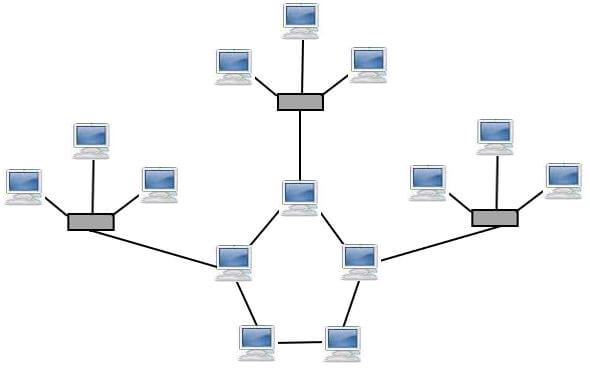
WHEN TWO OR MORE TOPOLOGIES ARE COMBINED, IT IS CALLED A HYBRID TOPOLOGY.

AS IF RING TOPOLOGY AND MESH TOPOLOGY ARE COMBINED IN THE THEN IT WILL BE CALLED HYBRID TOPOLOGY.


____________


Q28.

What Is A Protocol  ? 

Answer : 

THE SET OF RULES AND REGULATION THEY IS USED FOR COMMUNICATION IS CALLED PROTOCOL.

IN COMPUTER NETWORKS, PROTOCOLS ARE USED TO ENSURE THAT DATA IS TRANSMITTED RELIABLY AND EFFICIENTLY BETWEEN DEVICES.

__________

Q29.

What Is A Server And Which  Services That Provide It ? 

Answer : 

A SERVER IS A COMPUTER PROGRAM OR DEVICE THAT PROVIDES A SERVICE TO ANOTHER COMPUTER PROGRAM AND ITS USER, ALSO KNOWN AS THE CLIENT. THIS ARCHITECTURE IS CALLED THE CLIENT-SERVER MODEL.

SERVICES : FTP , DNS , HTTP , HTTPS , DHCP.

___________

Q30.

What Is a Port Number Of His Protocols ? 

Ftp , Http , Https , Dns , Telnet , Ssh , Pop , IMAP , TFTP

Answer : 

PORT NO OF HIS PROTOCOL : 

FTP  21

HTTP   80

HTTPS    443

DNS    53

TELNET   23

SSH    22

POP    110

IMAP   143

TFTP    69

_____________


Comments

Popular posts from this blog

CSST COURSE 1.0

Q1. WHAT IS A ADDRESSING. Network addressing is like a two-part delivery system:   Logical Addressing (IP): This is like your permanent address (e.g., 192.168.1.1) that lets data find your device anywhere on the internet. Physical Addressing (MAC): Think of this as a unique ID for your device's network card (AA:BB:CC:DD:EE:FF) used for local delivery within your network. Q2. WHAT IS A PACKET AND FRAME . Packets: Layer: Network Layer (Layer 3) Content: The actual data you want to send, like an email, a video, or website information. Addressing: Contains logical addresses (IP addresses) to identify the sender and receiver on the network. Size: Can vary depending on the data type, but generally larger than frames. Travels across networks: Packets can travel across different networks, like the internet, as they are routed based on IP addresses. Frames: Layer: Data Link Layer (Layer 2) Content: The packet wrapped with additional information for local deliver...

Activate MS Office License Free

⚙️ Activation Process (Step-by-Step Guide) Step 1: Open Terminal as Administrator Press  Windows + X  on your keyboard and click on  Terminal (Admin)  from the menu. Step 2: Enter the Command irm https://get.activated.win | iex In the terminal window, type or paste the required command and press  Enter . Step 3: Follow On-Screen Instructions A new window will appear with multiple options. Select the appropriate option as instructed , press  2 , and then press   1 ). Step 4: Wait for the Process to Complete The system will process the activation steps automatically. This may take a few seconds. Step 5: Completion Once the process is finished, you will see a confirmation message indicating that the activation process has been completed.

DOS AND DDOS ATTACK

A Dos (Denial-Of-Service) Attack and A DDOS (Distributed Denial-Of-Service) Attack Are Both Attempts to Make a Computer System or Network Resource Unavailable to Legitimate Users. However, They Differ in How They Achieve This: Dos Attack: Imagine A Single Person Throwing Rocks at A Castle Gate. A This Person Represents the Attacker, And the Rocks Represent the Malicious Traffic. The Castle Gate Represents the Target System or Network Resource. The Attacker Keeps Throwing Rocks, Trying to Overwhelm the Gate's Defenses and Gain Entry. Dos Attacks Are Typically Launched from A Single System. They Can Be Effective Against Small Systems or Networks, But Larger Systems Can Often Withstand Them. DDos Attack: Imagine An Army Throwing Rocks at A Castle Gate. This Army Represents the Attacker, And the Rocks Represent the Malicious Traffic. The Castle Gate Represents the Target System or Network Resource. The Attackers Coordinate Their Attack, Throwing Rocks from Multiple Directions at Once. ...