1. PORT SECURITY ENABLES YOU TO CONFIGURE EACH
SWITCH PORT WITH A UNIQUE LIST OF THE MAC ADDRESSES OF DEVICES THAT ARE
AUTHORIZED TO ACCESS THE NETWORK THROUGH THAT PORT.
THIS SECURITY ENABLES
INDIVIDUAL PORTS TO DETECT, PREVENT, AND LOG ATTEMPTS BY UNAUTHORIZED DEVICES
TO COMMUNICATE THROUGH THE SWITCH.
2. SWITCH PORT SECURITY LIMITS THE NUMBER OF
VALID MAC ADDRESSES ALLOWED ON A PORT.
WHEN A MAC ADDRESS, OR A GROUP OF MAC
ADDRESSES ARE CONFIGURED TO ENABLE SWITCH PORT SECURITY, THE SWITCH WILL
FORWARD PACKETS ONLY TO THE DEVICES USING THOSE MAC ADDRESSES.
3. BY USING PORT SECURITY YOU CAN SECURE YOUR
NETWORK FOR HACKER ATTACKE AND PROTECT YOUR NETWORK INFORMATION AND TRAFFIC.
TYPES OF VOILATION IN PORT SECURITY
1. SHUTDOWN
IN THIS VIOLATION WHENEVER AN ATTACKER ATTACH TO YOUR
NETWORK TO COMMUNICATE, THE ATTACKER
WITH WHOM IT IS ATTACHED TO YOUR SWITCH PORT WILL BE SHUTDOWN THIS PORT WHEN IT
STARTS COMMUNICATING.
2. RESTRICT
IN THIS VIOLATION, THE SWITCH SENDS AN
ALERT MESSAGE TO THE NETWORK ADMINISTRATOR FOR ABOUT ATTACKER.
3. PROTECT
IN THIS VIOLATION, THOUGHT ALLOWS ONLY THE
PORT THAT IS CONFIGURED TO SWITCH AND DOES NOT ALLOW COMMUNICATION TO ANY OTHER
PORT.
TYPES OF LOCK
1. DYNAMIC LOCK
IN THIS CONFIGURATION , THE PORTS MAC ADDRESS
IS AUTOMATICALLY SECURED.
2. STATIC LOCK
IN CONFIGURATION THIS LOCK WE SECURE THE MAC ADDRESS ITSELF.
__________________
CONFIGURATION
STEP 1
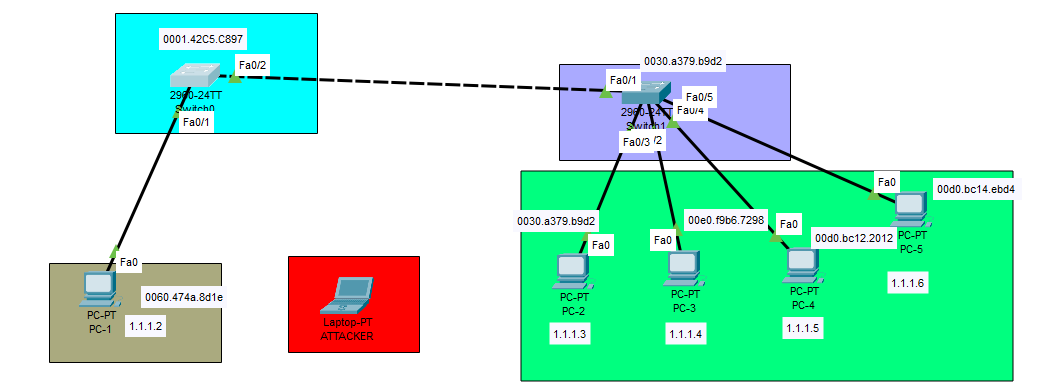
1. IN THIS STEP WE WILL TAKE A 2 SWITCHES AND 5 COMPUTERS AND AND ONE LAPTOP FOR EXAMPLE LAPTOP IS ATTACKER.
2. ASSIGN A IP ADDRESS IN ALL DEVICES.
STEP 2
1. CONFIGURATION SWITCH PORT SECURITY
2. ALL VOILATION CONFIGURED STEP BY STEP
3. LOCK CONFIGURATION
_____________________
STEP 1
1. IN THIS STEP WE WILL TAKE A 2 SWITCHES AND 5 COMPUTERS AND AND ONE LAPTOP FOR EXAMPLE LAPTOP IS ATTACKER.
2. ASSIGN A IP ADDRESS IN ALL DEVICES.
STEP 2
CONFOGURATION PORT SECURITY WITH STATIC LOCK AND VOILATION IS SHUTDOWN.
PORT SECURITY CONFIGURE ON PC-1 MACE ADDRESS
GO TO SWITCH(0) CONFIGURATION MODE AND ENTER THIS COMMANDS.
Switch(config)# inter fa0/1
Switch(config-if)# switchport mode access
Switch(config-if)# switchport port-security
Switch(config-if)# switchport port-security mac-address ?
WE ARE CONFIGURING THE STATIC LOG SO WE
HAVE TO WRITE THE MAC-ADDRESS OF THE PC.
Switch(config-if)# switchport port-security mac-address 0060.474a.8d1e
AND VOILATION CONFIGURE IS SHUTDOWN SO WRITE A SHUTDOWN IN COMMANDS.
Switch(config-if)# switchport port-security Violation ?
Switch(config-if)# switchport port-security Violation shutdown
Switch(config-if)# switchport port-security maximum 1
"MAXIMUM MEANS THAT WHEN WE CONFIGURE MAXIMUM NUMBER IS 2 EVER JUST
2 HOST CONNECTING WITH HIS INTER
FA0/1 PORTS.
WHEN HIS NUMBER ENTER 3 JUST 3 HOST ATTACHED HIS PORT."
GO TO ENABLE MODE OF SWITCH (0) AND ENTER COMMANDS.
Switch# sh port-security interface fa0/1
Switch# sh port-security address
AFTER THIS WHEN YOU WILL CONNECT PC-1 CABLE WITH ATTACK LAPTOP AND
YOU WILL ASSIGN IP ADDRESS TO THAT THEN
THAT CABLE WILL AUTOMATICALLY SHUTDOWN.
______________
GO TO SWITCH 1
CONFIGURE PORT SECURITY FROM SWITCH (1) CONFIGURATION MODE AND ENTER HIS COMMANDS.
Switch(config)# inter fa0/2
Switch(config-if)# switchport mode access
Switch(config-if)# switchport port-security
Switch(config-if)# switchport port-security mac-address ?
WE ARE CONFIGURING THE DYNAMIC LOG SO WE HAVE TO WRITE THE MAC-ADDRESS OF THE PC.
Switch(config-if)# switchport port-security mac-address sticky
Switch(config-if)# switchport port-security Violation shutdown
Switch(config-if)# switchport port-security maximum 5
GO TO ENABLR MODE SWITCH (1)
Switch# sh port-security
WHEN YOU PLUG THE ATTACKER
LAPTOP WITH ANY PORT OF SWITCH 1 AND ASSIGN AN IP ADDRESS TO THE LAPTOP, THEN
THAT LAPTOP WILL NOT BE ABLE TO COMMUNICATE WITH YOUR NETWORK IN ANY WAY.
 |
ATTAKER PING PC-3
_________________________ |


Comments
Post a Comment